How digital employees work
A digital employee is an AI work role with a defined job, knowledge, tools, and permission scope. It does not just answer questions. It remembers your team's context, takes over a whole piece of work, and hands it back to a person when it is unsure, missing information, or outside its authorization. This page explains what it can and cannot do within the scope you authorize.
What AI can do
Within the projects and knowledge bases you have authorized, AI can:
- Search, organize, and compare information;
- Identify potential outcome claims and their supporting sources;
- Draft Word documents, PDFs, PowerPoint presentations, and Excel workbooks;
- Generate a website draft with Magic Web;
- Help organize data and draft professional documents for SROI, ESG, ISO, and similar frameworks;
- Edit video or generate video from a script;
- Join team conversations when tagged to help organize the discussion.
What AI cannot do
The boundaries need to be explicit:
- AI produces a draft, not a formally approved final version;
- Preparing auditable documentation with AI does not mean an organization has passed ISO certification, SROI assurance, or any third-party verification;
- GuppyCubed does not replace the professional judgment of accountants, lawyers, consultants, or other qualified practitioners;
- High-risk actions and external publication always require human confirmation before they are carried out.
GuppyCubed is designed so professionals can spend their time on judgment instead of data preparation. AI first organizes information into a state that can be examined; qualified professionals remain responsible for assurance, verification, and sign-off.
Why high-risk actions require human confirmation
GuppyCubed separates AI preparation from human approval to ensure that:
- Someone is accountable for externally published content;
- Important figures have their sources checked before use;
- Professional conclusions are confirmed by qualified people rather than decided by AI.
This is not a compromise on efficiency. It is a core principle of GuppyCubed digital employees with built-in verification and accountability: AI accelerates preparation, while people confirm, judge, approve, and publish. Every digital employee has a human manager who sets its scope, handles exceptions, and decides on corrections.
Permission levels: decide per action how far it can go
GuppyCubed does not use a single "fully autonomous" switch for sending email, deleting, paying, and publishing. Permissions are set per employee and per action type:
| Level | Behavior | Typical use |
|---|---|---|
| Draft only | Produces a draft; a person decides whether to use it | External emails, first report drafts |
| Approve each time | A person approves before every run | Sending to clients, publishing posts |
| Ask on exceptions | Runs within rules and hands exceptions back to a person | File reminders, organizing material |
| Autonomous within rules | Runs within explicit rules and limits, reviewable afterward | Internal follow-up updates, scheduling |
This is a design principle for authorization. Today, high-risk actions such as external publication always require human confirmation; how each level is configured depends on the current interface.
Common work digital employees can do
For examples of what AI can help you produce, see:
- Create reports, presentations, and Excel workbooks with AI
- Generate a website from one sentence with Magic Web
- Professional outcome templates for SROI, ESG, and ISO
Turn a request into actionable work
Specify the reader, source scope, period, output format, and constraints. For example: “Use this quarter’s event records to draft a two-page partner update; identify missing information and propose an outline first.” Agreeing scope before a long output reduces rework.
Continue after the response
Check selected sources, separate facts from inferences, request wording corrections, assign human follow-up with owners and deadlines, then choose the final file format. Review any additional tool authorization before granting it. Mentioning restricted material in a prompt does not grant access.
Preserve useful troubleshooting context
Record the failed action, time, and message, together with expected and actual results. Provide only a minimal example with sensitive information removed. This helps distinguish source, permission, processing, and formatting problems.
Prepare sources before prompting
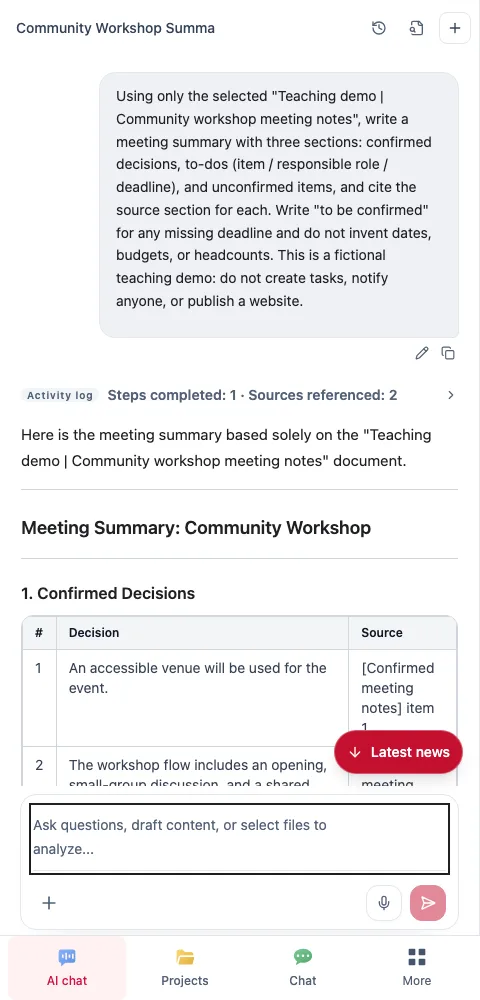
Four parts of an effective request
Describe the purpose, permitted sources, output, and constraints. These are more actionable than “make it professional and detailed.”
| Part | Workshop example |
|---|---|
| Purpose | Prepare for the next planning meeting |
| Sources | Use this tutorial note, not other projects |
| Output | Decisions, actions, owner roles, and open points |
| Constraints | Invent no dates, budgets, or attendance |
Use two rounds
First ask for source organization and gaps, then check understanding. Request the report, slides, or spreadsheet after the outline is agreed. Otherwise an impressive document may conceal unresolved assumptions.
For revisions, identify the location and reason: “Item two changed asking about a venue to a completed reservation. Restore the pending status from the original and retain the other checked items.”
Diagnose an unhelpful response
- Missing material: check selection, workspace, processing, and access.
- Misinterpretation: point to the source passage and intended meaning.
- Wrong direction: restate readers, purpose, and output scope.
- Invented content: remove the inference and list a question for confirmation.
Return AI output to team work
Give remaining human actions owners and acceptance criteria. A to-do list in conversation does not necessarily mean tasks were created and assigned. Confirm actual records in the task entry. Check generated text, system actions, and team decisions separately.
Next step
To learn how GuppyCubed establishes trust and differs from general-purpose AI chat tools, read How trust is established.