Project handover documents and report drafts: checklist and example
What should you prepare before handing over a project?
Identify the recipient, deliverable and deadline. Gather work records, selected sources, the method behind important numbers, responsible people and unresolved items. AI can organize selected material into a draft; people decide what is ready to share and agree on acceptance criteria with the recipient.
This guide is for small teams delivering client or project work, including agencies, event teams, consultants and grant recipients. Grant closeout is one example. It covers document preparation and human review, not a completed independent verification or client-signature service. For the product and plans, visit the GuppyCubed homepage.
From an event to a closeout report
Create an activity → Open registration and generate a QR code
→ Check in participants, coordinate volunteers, and collect photos and reflections
→ Keep all information in the same project when the activity ends
→ Tell AI, “Prepare a closeout report for this activity”
→ Confirm available material and permissions, and select relevant records
→ AI uses the selected sources to prepare a draft
→ A person verifies the figures and content, edits the draft, and publishes it
See Events and volunteer management and Create reports with AI.
From a field recording to meeting notes
Start recording in the mobile app during an interview or meeting
→ Upload the recording and transcribe it automatically
→ Tell AI, “Turn this into meeting notes”
→ AI reads the transcript and prepares a draft
→ A person confirms and saves or publishes it
See Mobile app and Library.
From a survey to an outcome presentation
Create or import a questionnaire → Publish its link and QR code
→ Collect responses and let the system generate statistics automatically
→ Create an AI analysis dataset
→ Tell AI, “Create an outcome presentation from this dataset”
→ A person reviews the data, charts, and narrative and finalizes the presentation
See Surveys and data collection.
From a donation project to a public use-of-funds update
Create a donation project → Generate a public donation page
→ Receive one-time or recurring donations and retain transactions and receipts
→ Create use-of-funds content explaining where the money went
→ Connect related activities, photos, and outcome content
→ Let donors view and interact with the update
See Donations and use of funds.
From organizational knowledge to a published website
Select the organization, project, or donation topic to present
→ Describe the website's purpose to AI
→ AI searches the knowledge base and available assets and prepares a website draft
→ A person previews, edits, and approves it
→ Publish and connect a custom domain if needed
See Generate a website from one sentence with Magic Web.
Connect the first workflow through actual entries
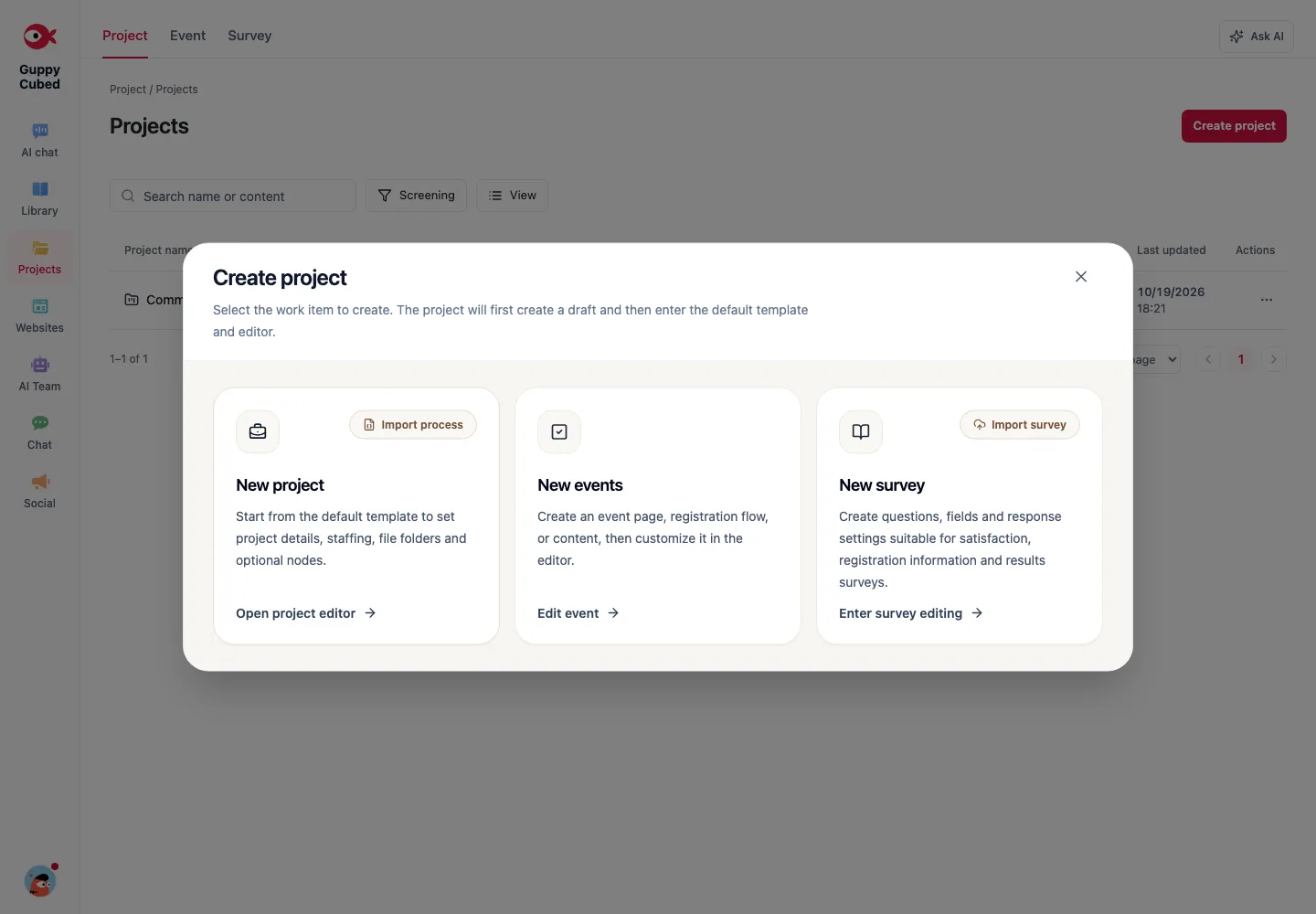
Check the work scope in project management, then create an event or survey. Use mobile recording for interviews and verify transcripts before requesting an outcome draft.
Make every handoff concrete
| Stage | Input | Handoff |
|---|---|---|
| Planning | Goal, period, responsibilities | Tasks and collection requirements |
| Collection | Events, responses, files, recordings | Material with checked locations and status |
| Organization | Usable sources | Draft, citations, and gaps |
| Review | Draft and originals | Revisions and unresolved issues |
| Delivery | Checked material | Current report or public page |
Handle missing information
If registrations and attendance differ, retain separate definitions and ask the owner to reconcile them. Do not let AI select the more favorable number. Deliver a qualified progress update when necessary and schedule follow-up.
Publishing a workflow or a result
Explain responsibilities, collection, and review when publishing processes. Real case figures, names, and images require a confirmed publication scope. Label demonstrations clearly rather than presenting them as partner results.
Follow one workflow across web and app
Prepare scope and destinations on the web, capture field material with the app, then return to source review and drafting. Device choice matters less than retaining workspace, material, and action context at each handoff.
| Transition | Carry forward | Common omission |
|---|---|---|
| Discussion to task | Decision, owner, requirements | “Handle later” without responsibility |
| Field to knowledge | Original, topic, date, purpose | A recording with no known destination |
| Knowledge to AI | Sources, readers, constraints | Only “make it more complete” |
| Draft to review | Sources, open points, version | A polished but unverifiable file |
| Review to handoff | Adopted content and next owner | No clear usable version |
Run a small rehearsal
Use one permitted practice note. Have one role add it and another inspect the summary and request a correction. Record whether obstacles concern navigation, permission, requirements, or processing.
Fix the obstacle affecting handoff most, then repeat the same steps. Retain the example, roles, and delivery requirements for onboarding.
Judge the workflow
Ask the recipient to identify a decision's source, an unresolved point, and the next owner without asking the author. Improve naming, explanation, or acceptance criteria where they cannot, rather than merely creating more documents.
Worked example: from a note to Word delivery
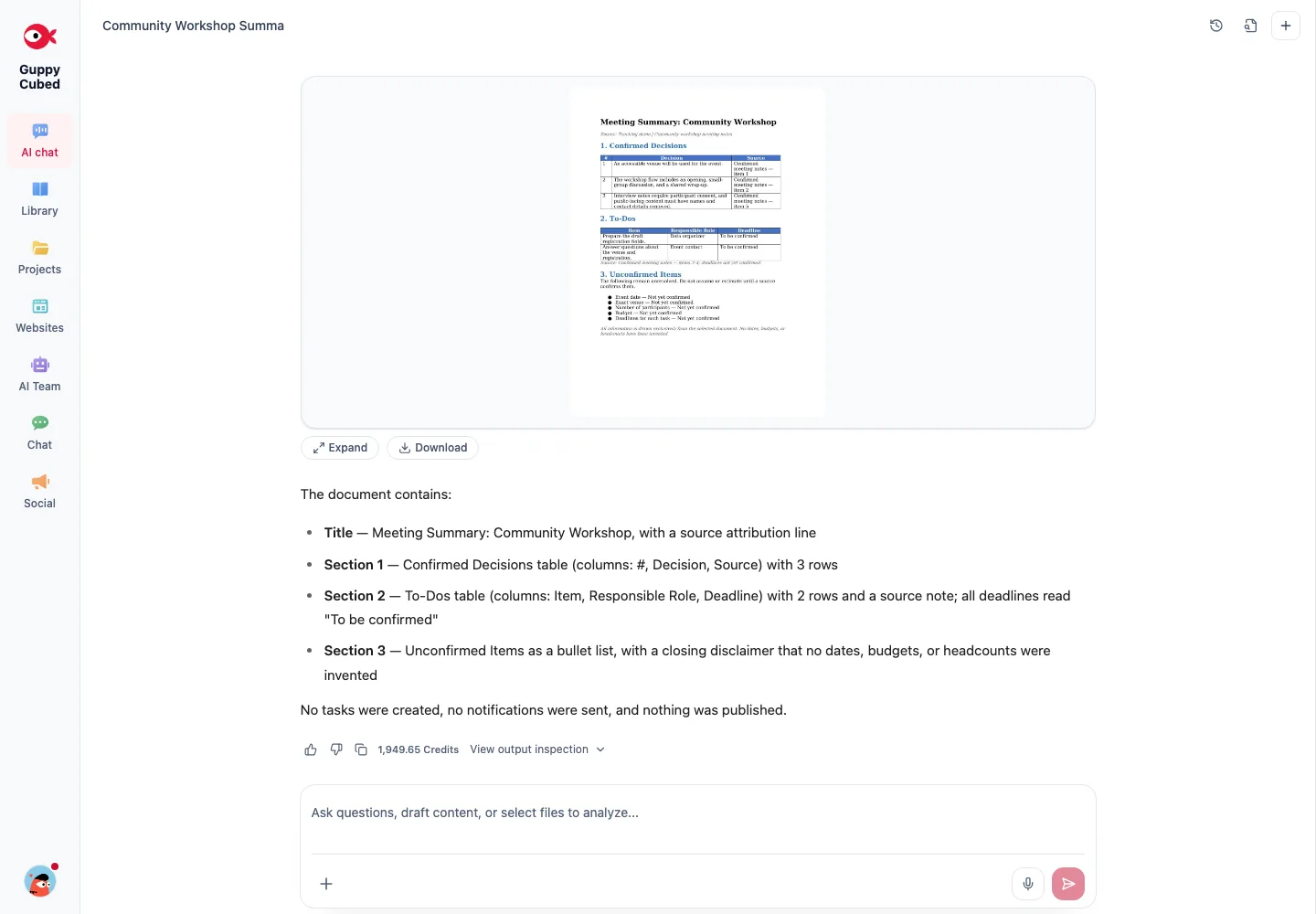
This operation uses a completely fictional workshop note. Add text with decisions, roles, and unresolved information, select the stored knowledge item, and request a meeting summary. After review, request a Word file.
The actual result preserves unresolved dates, venue, and deadlines rather than inventing values. Check content before use and decide separately whether to save it to knowledge. Repeat the steps with quickstart and report generation.
Download the practice material
Download the tutorial source and sample Word summary. Compare the original with the output. All material is fictional; unresolved dates, venue, and figures are intentionally retained for review practice.