Donations and use of funds
Complete activation requirements first
The production user menu provides donation activation under other settings. Prepare basic information, story material, recipient details, and required agreement documents. Follow the screen’s field and attachment requirements. Activation, page drafting, and actual collection are different stages.
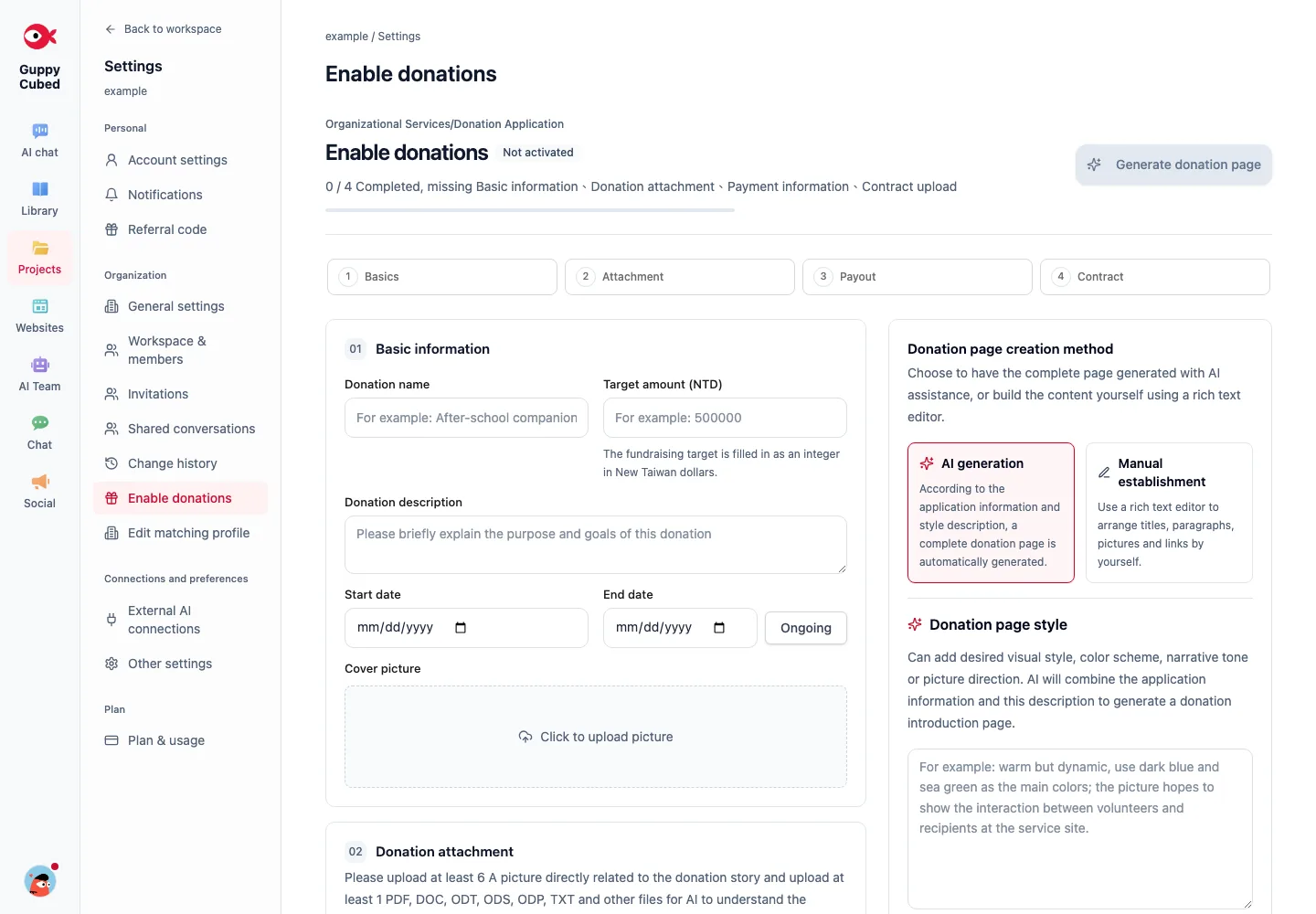
Create a donation project and public page
Create a donation project in the workspace and configure donation methods, suggested amounts, and public-page content. You can build the public page manually with the standard editor or ask AI to draft it from existing information and refine it yourself.
One-time and recurring donations
GuppyCubed supports both one-time and recurring donations. Donors can change or cancel the amount and schedule of a recurring donation.
Issue, download, and resend receipts
The system generates electronic receipts according to your settings. Donors can download them, and the organization can resend them. Personal donation histories, donor lists, and corporate donations are organized in one place for easy reference.
Use-of-funds content: explain where the money went
After receiving donations, create use-of-funds content to explain which work the money supported and what progress or outcomes it produced. Connect the update to related events, photos, and outcome content. Donors can interact and leave comments on the page.
:::caution Important Use-of-funds content is a public communication feature. It explains how money is being used; it is not a complete accounting ledger, a statutory fundraising reconciliation system, or an automatic reimbursement process. Formal reconciliation and expense settlement must continue through the organization's established accounting procedures. :::
GuppyCubed takes no percentage of donations
GuppyCubed charges organizations a platform fee and does not take a percentage of donations. Third-party payment services process donations at their standard rates; GuppyCubed does not handle those fees.
Common scenario
- To understand why connecting only a payment provider is different from using GuppyCubed, see How does GuppyCubed compare with Notion and Google Forms?. Payment providers collect money; GuppyCubed connects receipts, donor disclosure, donation records, and outcome updates so donors can see what their money became.
Separate public information from internal records
Confirm the recipient organization, purpose, public contact, and receipt details. Explain the supported work and how donors can follow updates. Donor contacts and accounting records should not appear directly in public content.
Review from the donor’s perspective
Check consistency among one-time or recurring methods, amount options, payment, and receipt explanations. Reviewing settings and previews does not require a real payment or resending a receipt. Verify the record and authority before refund, cancellation, or correction actions.
Explain fund use clearly
| Topic | Supporting material |
|---|---|
| Work supported this period | Scope and execution records |
| Progress and completed items | Dates, photos, checked information |
| Differences from the plan | Original plan and explanation |
| Next period | Follow-up and responsible contact |
Use publishable records with periods and definitions for figures. Describe ongoing work as ongoing rather than presenting targets as completed results.
Review and maintain
Have an organizational owner review public wording against records before publishing. Donor communication and formal accounting serve different purposes; resolve accounting discrepancies through the organization’s established reconciliation process.
Reconcile funding and delivery separately
Donation records describe funds and intended use; delivery material describes completed work. Receiving funds does not establish execution, and photos cannot replace reconciliation of use.
Prepare activation information
Use the actual application to provide organizational, contact, and payment information. Keep banking details in the appropriate settings rather than tutorials or public pages. Check application or availability status after submission.
Explain three things publicly
Describe the concrete purpose, expected use, and how progress will be updated. Do not fill unconfirmed budgets or outcomes with example figures. Agree on partner reporting requirements and disclosure first.
Preserve transaction-state differences
Initiated payments, successful payments, and refunds differ. Reconcile actual transaction records rather than treating a payment-page visit as receipt. Follow the organization's process and available interface for reconciliation and receipts.
Publish methods and updates without exposing donor information. The activation screenshot demonstrates an entry point, not completed fundraising.